gofer: run Claude Code and Codex as reviewable jobs on your own machines
With three or four Claude Code and Codex sessions open across two computers and a container, I kept losing track of simple things. Which session is waiting for me? What did the agent I asked to fix a test change, and did it run the tests? The job I handed out last night: did it finish, get stuck, or crash an hour in? And when I’m away from my desk, can I check from my phone and approve something?
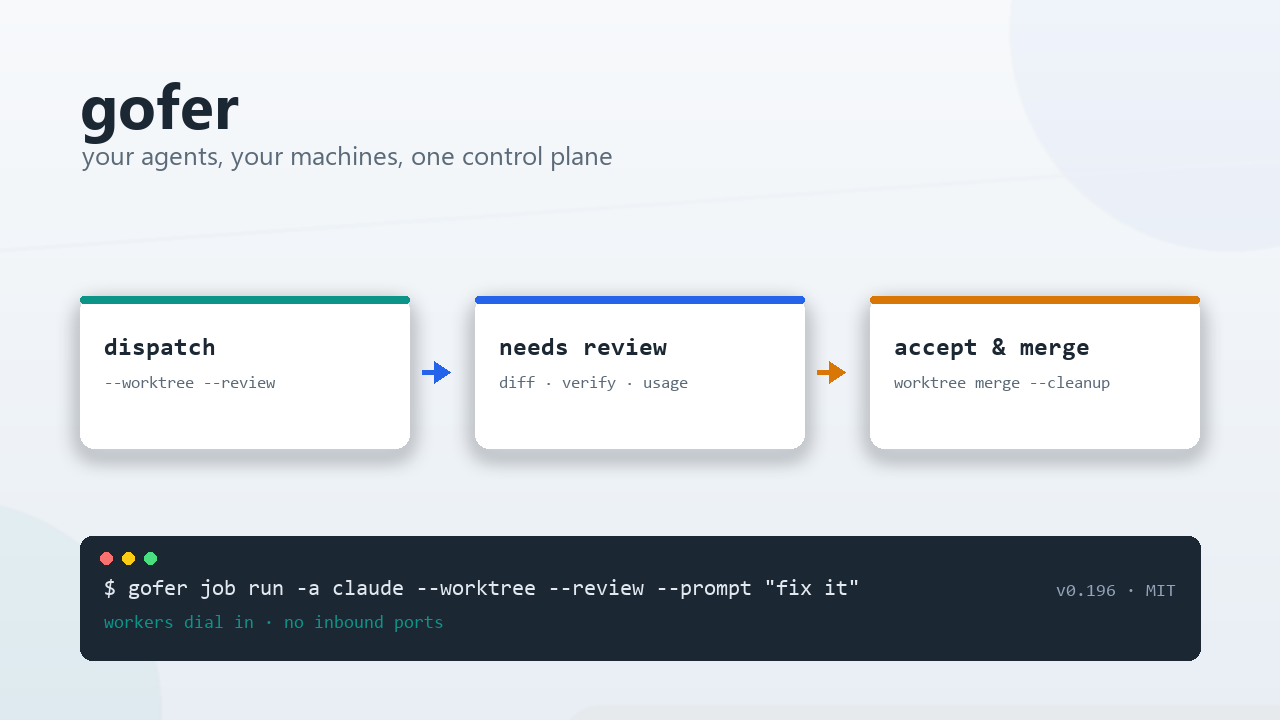
gofer is the tool I wrote for that. In one line: your agents, your machines, one control plane. It runs Claude Code, Codex, ACP agents or plain commands as tracked, reviewable jobs on every machine you own, with no cloud in between and no inbound ports to open on the workers.
The basics up front: gofer is MIT licensed, a single Go binary with a web console built in. The current version is v0.199. It is still 0.x, it ships often, and interfaces may change; the CHANGELOG is the source of truth. Here is what it does.
- Repository: github.com/inhere/gofer
- Releases: releases/latest (Linux, macOS and Windows binaries, web console included)
What it is, and what it isn’t
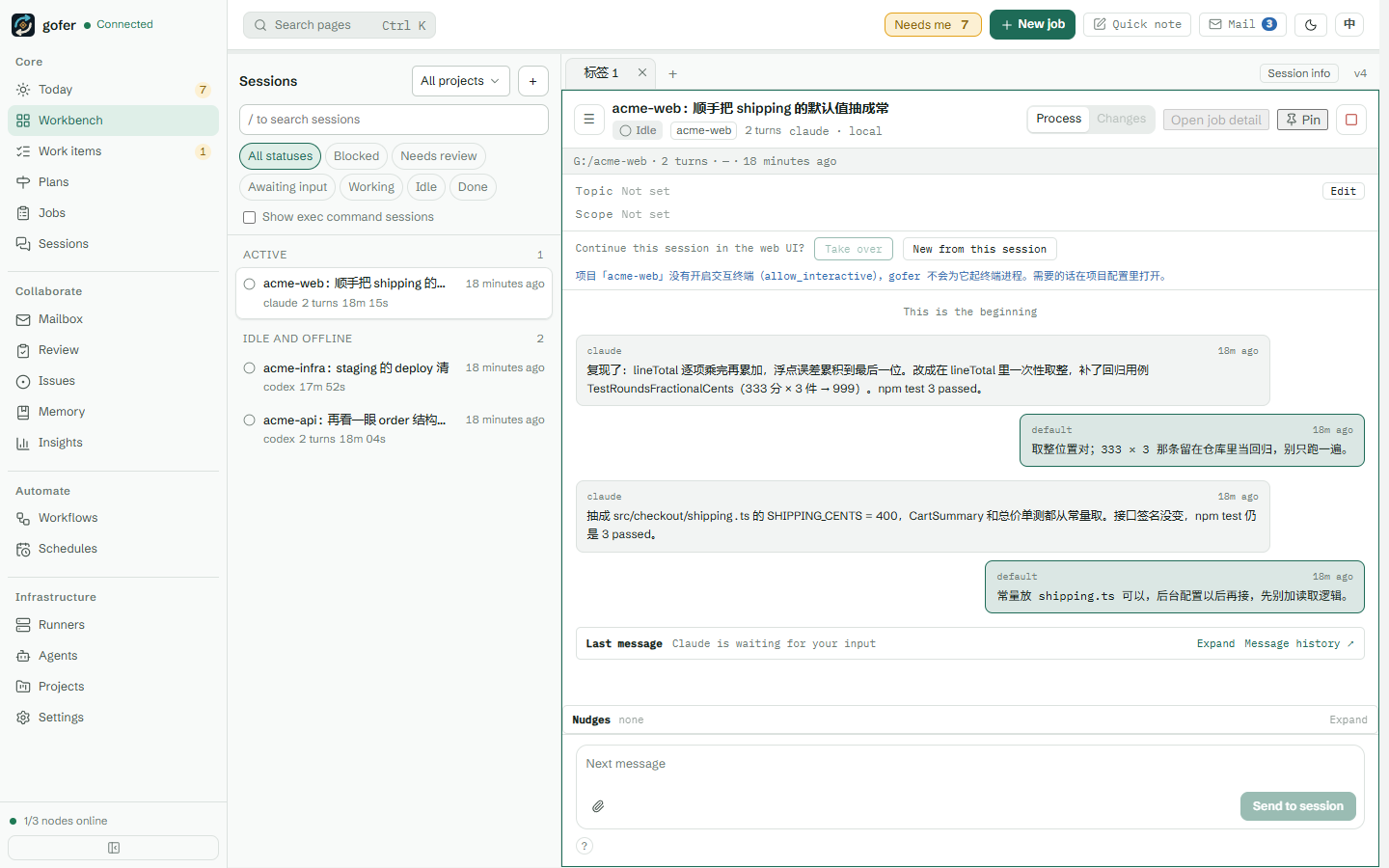
gofer has three parts:
- server (
gofer serve): the single source of truth. Projects and their admission rules, the job store, scheduling, the HTTP API and the web console all live here. One per machine. - worker (
gofer worker): an executor on another machine or in a container. It dials into the server, reports which directories and agents it has, and runs jobs locally. No inbound port needed. - agent: the program that does the work. gofer ships no model. It starts and supervises CLIs you already have:
claude,codex,omp, an ACP agent, or a plain command.
It is not an agent, a hosted service, a CI system or a sandbox, and it has no multi-tenant mode. Access is token based, and a job runs with the permissions of the gofer process that executes it. It fits one developer, or a small team that trusts each other.
What a job looks like
The smallest example runs one command:
gofer job run -p <project> -a exec --title "hello" --sync -- go version
gofer job logs <id>
What I use every day is handing work to an agent and having it stop for review when it’s done:
gofer job run -p <project> -a claude --title "Fix the flaky test" \
--worktree --review --prompt "Find why TestFoo fails intermittently, fix it, run the related tests"--worktree: the job changes code in its own git worktree and branch, so the main checkout stays untouched. Several agents can work on the same repository without stepping on each other.--review: when the agent finishes, the job is not marked done. It waits in “needs review”.
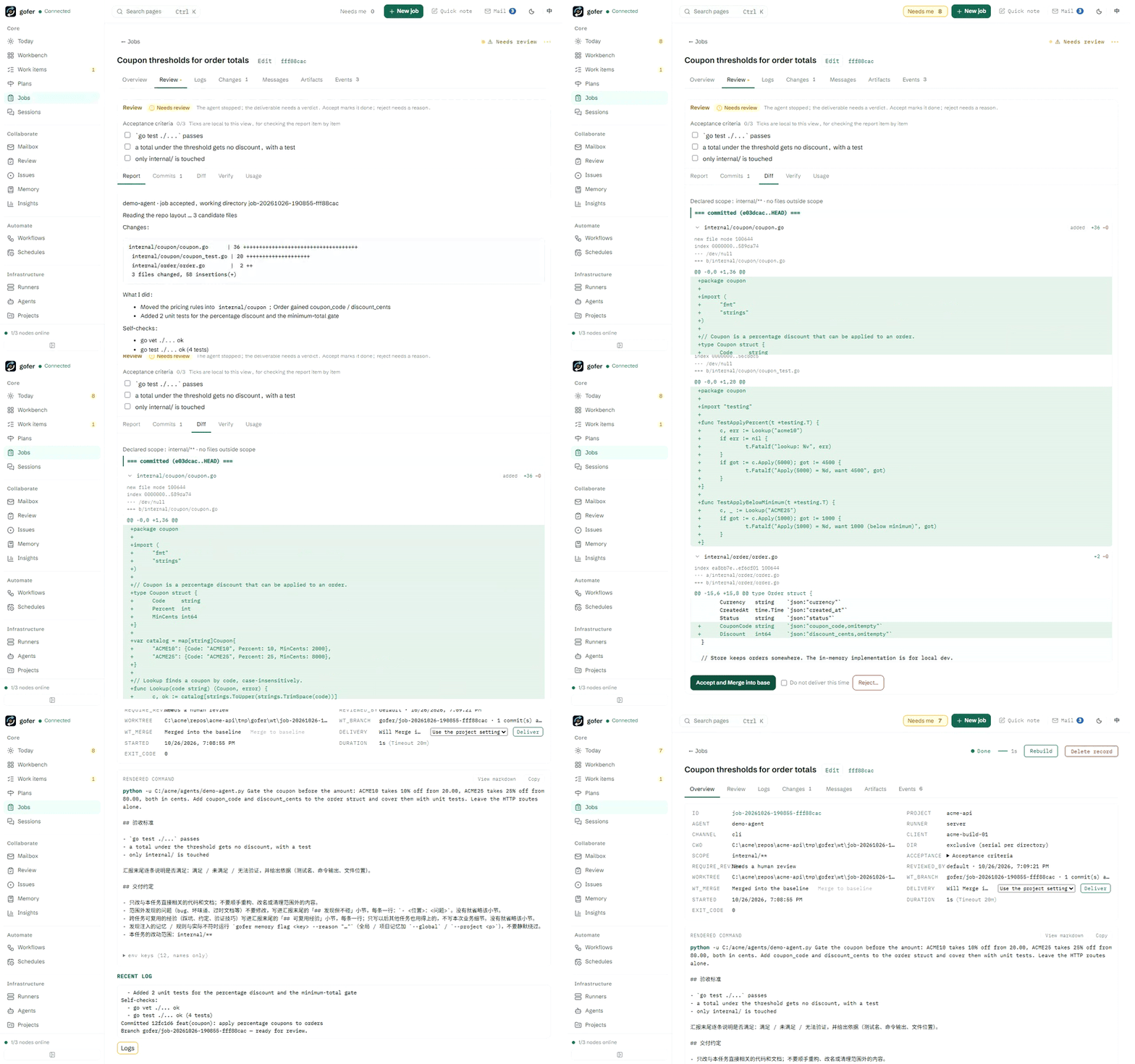
Reviewing puts the agent’s report, its commits, the diff, the verify output and token usage on one panel. Accept and merge, or reject with a reason and let the agent continue in the same session:
gofer job review <id>                     # everything on one terminal screen
gofer job accept <id>                     # or: gofer job reject <id> --note "…" --resume
gofer job worktree merge <id> --cleanup   # merge into the main branch, remove the worktree
In short: hand work to any coding agent, then accept or reject it like a pull request.
Many machines, one console
My setup is a Windows workstation, a Linux container and two more Windows machines. They all connect to one server as workers:
# on the server: register the worker and get a one-time token
gofer worker add <worker-id> --project <project>
# on that machine: infer directories, probe agents, write the config, self-check, run in the background
gofer worker init --server http://<server>:8765 --id <worker-id> --token <one-time token>
gofer worker -d
After that, --runner <worker-id> sends a job there. Upgrades are one click in the console. The server waits for running jobs to finish before it restarts, then upgrades the workers one by one; a worker on a different OS or architecture downloads its own build from the release source.
Pick up terminal sessions on your phone
A lot of the time I’m not dispatching jobs at all. I’m working in a terminal with Claude Code. gofer can register those sessions too:
gofer init hooks --agent all --global   # register Claude Code / Codex / omp sessions
gofer session relay on                  # when the session stops, wait for my reply on the web
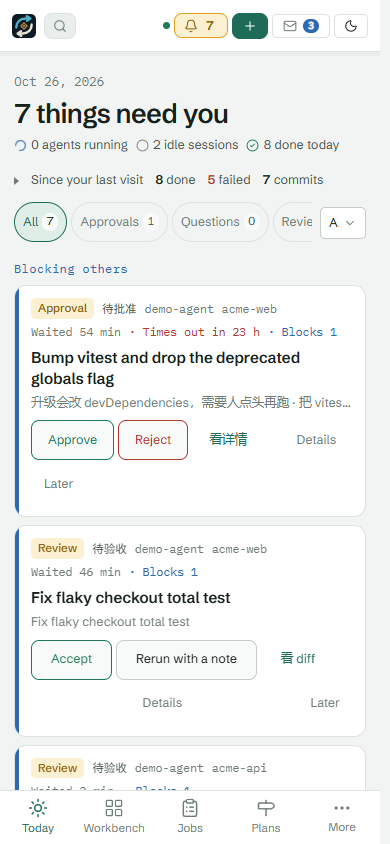
When a session stops and needs a decision, I can see what it asked from a browser or my phone, reply to it, or wake up a session that has already stopped. The console’s home page, “Today”, is one queue of everything waiting on me: jobs to approve, questions to answer, results to review, sessions waiting for a reply.
For ACP agents you can also turn on approvals. Tool calls that edit files or run commands wait for a person, and read-only tools pass through.
On top of jobs: plans, a mailbox, a tracker in the repo
There are a few layers above single jobs. Later posts in this series cover each one:
- Plans: break a batch of work into todos with dependencies. When one finishes, the next is dispatched. One task can also fan out to several agents so you compare the results and merge the best.
- Mailbox: sessions and jobs write to each other by address in real time. Sender and receiver can be different agents (
claude-code <-> codex) on different machines. For example, the session working on the frontend can tell the backend session “the endpoint is ready”. - Tracker and memory in the repository: issues and what the agents learned are stored in the repo (
.gofer/tracker), so they travel with the code, and the web console can search them across projects. - Schedules: cron or one-off, with parameters. I use one to clean build caches every day.
There are four entry points, all working on the same jobs: the CLI, the HTTP API, an MCP server, and the web console.
Built with itself
I started gofer in mid-June 2026. Four months on, it has more than 3,700 commits and 290 releases. Most of it was written by agents running on gofer: in one Claude Code session I design, split the work and review; the implementation goes to agents in worktrees, each job stops in review, and I read the diff and the tests before merging and releasing. The server has 12,415 jobs on record, 10,901 done and 1,216 failed.
Many of those thousand-plus failures came from debugging gofer itself: test timings too tight under load, races between concurrent git worktree operations, a release script that swallowed a failed merge. I’ll write those up in a separate post.
suga, my personal coding agent written in Go, was built the same way. Its introduction is the previous post.
Compared with other tools
There are plenty of tools in this space, and each has real strengths:
- Claude Code’s own Remote Control needs no setup and has an official phone app, but it only covers Claude, with one machine per process.
- Conductor feels great on a Mac. It is closed source, and its cloud and mobile features are paid.
- Superset is the closest to gofer: a desktop app with multiple hosts and an iPhone / iPad app, licensed under ELv2.
gofer’s trade-offs: MIT, with the control plane in your hands too; not tied to one agent vendor; a server plus a web console instead of a desktop app; and fairly complete workflows around handing work out and taking it back (review, approvals, plans, the mailbox). The cost is that you run a server yourself, and the interface is less polished than a desktop app.
Limitations
- It is not a sandbox. Jobs run with the gofer process’s permissions, and a token means the ability to run commands on the machines that execute jobs. Keep it on your machine, a private network or a VPN, and don’t expose it to the public internet as is.
- It is meant for one person or a small team that trusts each other. There is no multi-tenancy.
- I mostly use it on Windows and Linux. macOS works, but I haven’t used it there day to day.
- Part of the documentation is still in Chinese. The English getting started guide, concepts, features and security pages are written.
Try it
eget install inhere/gofer      # or download the archive for your platform from Releases
gofer init server --global
export GOFER_TOKEN=change-me   # Windows: $env:GOFER_TOKEN = "change-me"
gofer project add <project> --host-path /abs/path/to/<project> \
  --default-agent codex --allow-agent codex --allow-agent claude --allow-agent exec \
  --allow-runner server --allow-exec
gofer serve
Then open http://<server>:8765/ in a browser and paste the token. The full walkthrough is in the repository’s getting started guide.
This is the first post in a series on gofer. Next up, one feature at a time: reviewing agent work like a pull request, one server with many machines, managing agents from your phone, plans and workflows, agents writing to each other, the Today queue and the steward, the tracker and memory in the repo, and what I ran into while building gofer with gofer. If you hit a problem, please open an issue on GitHub.